How to Sell Used Books on Shopify (ISBN Barcode Scanning)
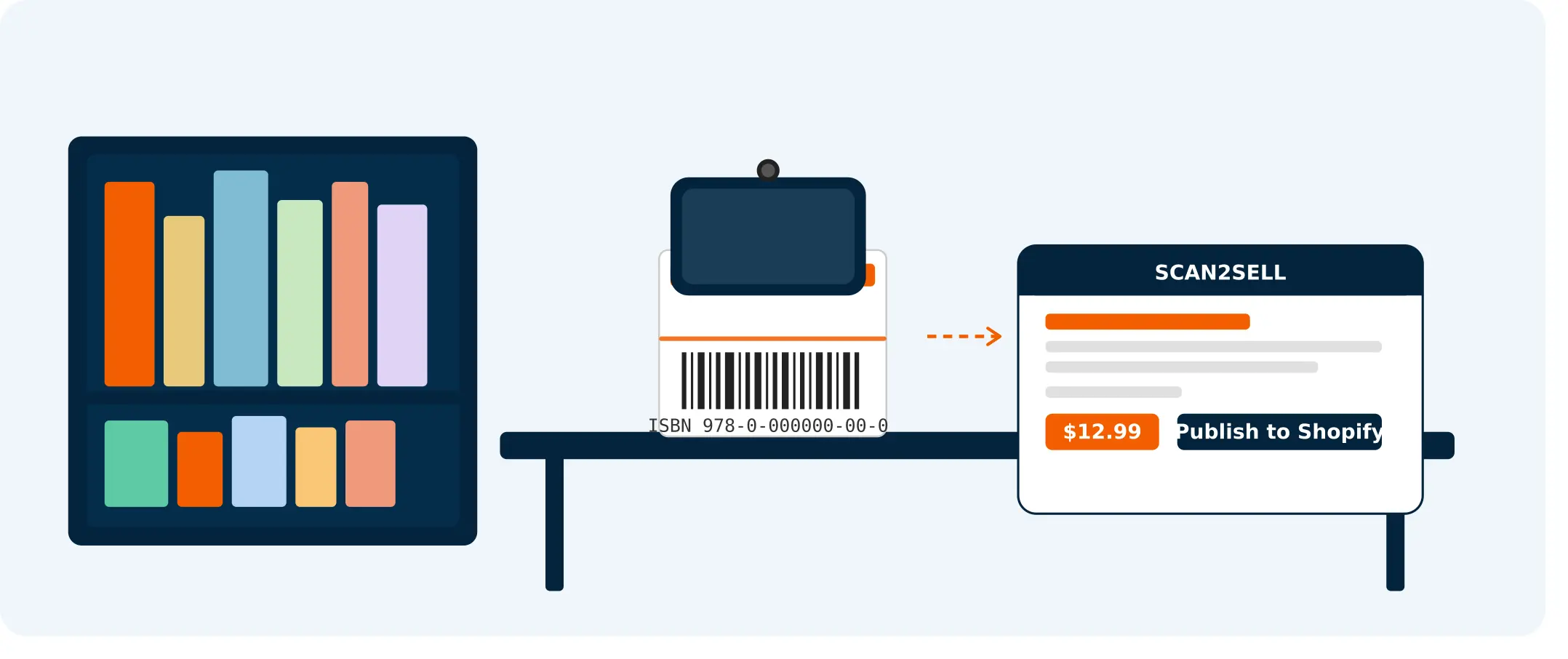
Every used book already has a barcode on the back cover. Scan the ISBN and a ready-to-publish Shopify listing appears — title, description, format, category, and images already there.
Every used book already has a barcode on the back cover. For most people selling books online, that barcode just sits there — ignored, while they type titles, descriptions, and edition details one at a time.
But that barcode is an ISBN, and it holds everything you need to build a clean product listing.
If you're working through a box of donated paperbacks, clearing a personal collection, or running a retail bookstore, this is the part where things get significantly less tedious.
Why Used Books Are Actually Perfect for This
Most products that land on a Shopify store take real effort to identify. No barcode, no standard reference — just a product and whatever the seller can piece together.
Books are different. Every ISBN is a unique identifier tied to a specific edition of a specific title.
That means the author, publisher, format, and edition year are all encoded in that single barcode on the back cover. When you scan it, that information is already structured and ready.
A product title appears. A description is there. Category and format details come through. Product images appear automatically when you scan.
You're not starting from scratch. You're reviewing details that are already accurate, adding a price and quantity, and approving for your Shopify store.
How It Works with Scan2Sell
Scan2Sell is a Shopify app built for exactly this kind of physical-inventory workflow. Here's what using it with a stack of used books actually looks like.
Scan the barcode. Open Scan2Sell on your phone, point the camera at the ISBN barcode on the back of a book, and the listing begins to populate. No typing, no searching.
Review what appears. The product title, description, category, and images are already there. Read through, make any edits you want — condition notes, specific edition details, anything you'd add as a seller — then set your price and quantity.
Publish to Shopify. One tap and it's live in your store. Pick up the next book and repeat.
That's the whole loop. For someone working through 50 books on a Saturday afternoon, the time difference is real.
From shelf to Shopify: the 4-step process
Here is what the listing workflow looks like in practice, from picking up a book to hitting publish.
Step 1: Scan the ISBN barcode
Point your phone camera at the barcode on the back cover. Scan2Sell reads the ISBN and a structured product listing begins to take shape — title, description, format, and category are all there.
Step 2: Review what appears
Product images appear automatically when you scan. Look over the listing, add condition notes or seller commentary, and confirm the details are accurate before you move on.
Step 3: Set your price and quantity
Add the price you are asking and how many copies you have in stock. If you are working through multiples of the same title, you only need to do this once.
Step 4: Publish to Shopify
One tap and the listing is live in your Shopify store. No copy-pasting, no switching between tabs. Pick up the next book and repeat.
No Barcode? Take a Photo Instead.
Older books, self-published titles, or anything with a damaged spine sometimes come in without a readable barcode. In those cases, Scan2Sell lets you take a photo of the book — cover, spine, whatever gives the most information — and uses that image to help structure the listing.
It's not a workaround you'll dread. Same flow: snap, review, edit, publish.
Working Through a Larger Collection? Use CSV Upload.
If you're a library sale organizer or someone who's inherited a cataloged collection, scanning book by book is still fast, but there's a bulk option worth knowing about.
Scan2Sell supports CSV uploads. If you already have a spreadsheet of ISBNs from a prior inventory system, a library database, or even a cataloging tool you've been using, you can download Scan2Sell's own CSV template from the app, enter your ISBNs, upload it back, and listings are generated for each entry without requiring individual scans.
This is particularly useful if you're working through several hundred books in one go. Upload once, review the results, adjust prices, and publish in bulk.
It Works with Shopify POS Too
Running a physical bookstore and selling online at the same time? If you're already using Shopify POS in-store, Scan2Sell integrates with it. You can scan from your in-store environment and start building online listings without switching between systems.
That means your in-store and online inventory can live in the same place, managed from the same scan.
Frequently asked questions
Common questions about selling used books on Shopify with ISBN barcode scanning.
Do I need a special barcode scanner to use Scan2Sell with books?
No. Your phone's camera is the scanner. Scan2Sell is designed to work with the camera you already have. If you do use a Bluetooth handheld scanner for volume work, that's supported too — but it's not a requirement.
What if the book doesn't have an ISBN barcode?
Older books, self-published titles, or anything with a damaged cover sometimes come without a readable barcode. In that case, you can take a photo of the book instead and Scan2Sell uses the image to help structure a listing. It works the same way — snap, review, edit, and publish.
Can I list a large collection of books at once?
Yes. If you have a spreadsheet of ISBNs — from a cataloging system, a library database, or a prior inventory list — you can download Scan2Sell's own CSV template, enter your ISBNs, and upload it back. The app processes the batch and generates listings for each entry without requiring individual scans.
How many books can I list per month before it gets expensive?
The usage plan is $99 per month and includes unlimited scans. There is no per-book fee regardless of how many titles you list.
Does Scan2Sell work with Shopify POS for in-store book sales?
It does. If you're running a physical bookstore on Shopify POS, Scan2Sell integrates with your existing setup. You can scan in-store and build online listings from the same environment without switching between systems.
Ready to work through your book inventory?
Scan2Sell is $99 a month with no scan limits. Start listing used books on Shopify today.
Get Scan2Sell on Shopify