A practical answer for retailers who want to scan products and get listings live without the guesswork.
The Short Answer
Any Bluetooth barcode scanner that pairs with your phone will work with Shopify, provided you have the right app connecting the scan to your listings. The scanner itself is just the input device. What matters is what happens after the scan, and that depends entirely on the software receiving it.
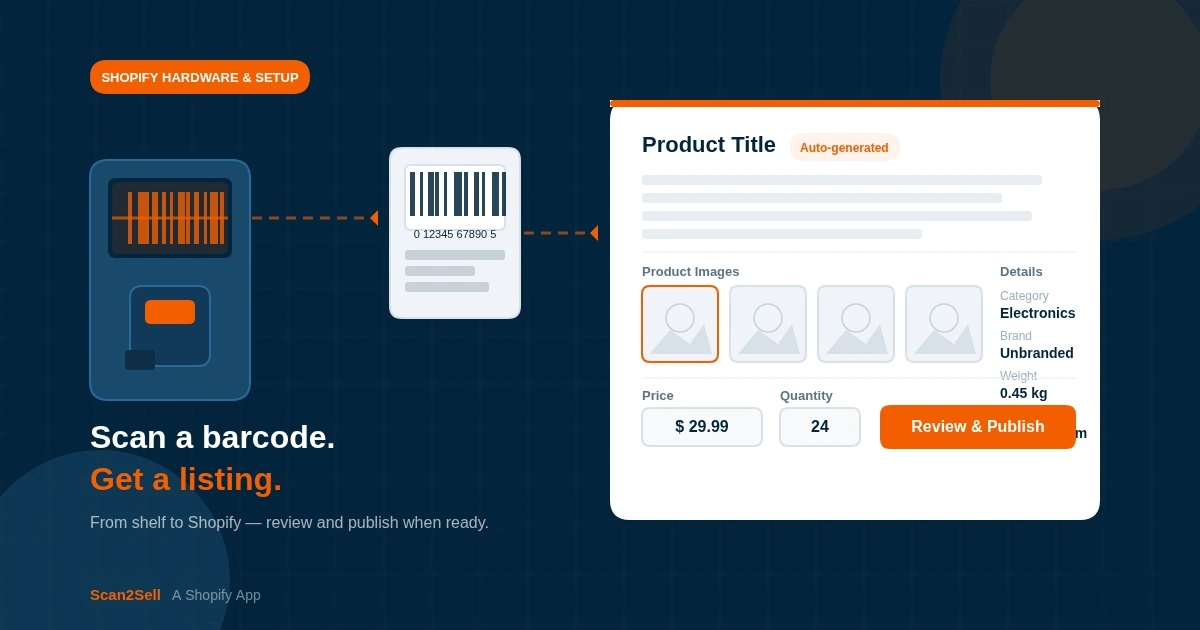
If you are scanning products to create listings, the workflow is: scanner reads the barcode, a barcode number appears in your app, and the app does the work of turning that number into a structured product listing. Without an app built for that purpose, you are just typing numbers into a text field manually.
Bluetooth Scanners vs. Phone Camera: Which Should You Use?
Most merchants starting out use their phone camera to scan barcodes. It works, it is free, and you already have it. For low volumes, say you are getting a new product line live or working through a seasonal restock, it is completely practical.
Bluetooth handheld scanners make sense once you are moving through inventory at any real pace. A dedicated scanner reads barcodes faster and more reliably than a phone camera, especially in bright light, on shiny packaging, or when barcodes are small or worn. Your phone stays in your pocket, and you are scanning with one hand while handling product with the other.
A Bluetooth scanner is not a Shopify product. It is a generic input device. The question is always what your Shopify app does with the signal it receives.
What Scanners Are Actually Compatible?
Most standard Bluetooth HID (Human Interface Device) scanners will work. HID mode means the scanner behaves like a wireless keyboard to your phone or tablet, sending the barcode number as a string of characters. Common examples that retailers have reported using include the Zebra CS60, the Honeywell Voyager series, and the Socket Mobile CHS series. Budget options from brands like Tera or Eyoyo also work in HID mode and cost considerably less.
Before buying, confirm two things: the scanner supports Bluetooth HID mode, and it can connect to your phone or tablet's operating system. Most modern scanners do both. If you are unsure, search the model name and "HID mode" before purchasing.
You do not need a scanner specifically marketed as "Shopify-compatible." That label is mostly marketing. What you need is HID mode and a Bluetooth connection.
What Happens After You Scan?
This is where the real difference sits. Scanning a barcode in isolation does nothing useful for Shopify. The barcode number needs to be processed by something that can turn it into a product listing with a title, description, category, and images.
Without that layer, you end up manually looking up the product, copying details across, sourcing images separately, and entering it all into Shopify by hand. That is the workflow most small retailers are still stuck in, and it is slow.
Scan2Sell is a Shopify app built specifically for this. When you scan a barcode, either with your phone camera or a paired Bluetooth scanner, a structured product listing appears with a suggested title, description, product category, dimensions, and product images as part of the output. You review the details, set your price and quantity, and publish. Nothing goes live until you approve it.
What About Scanning Products That Have No Barcode?
Not every product has a scannable barcode. Handmade goods, vintage items, and some wholesale products have no UPC or EAN attached. For these, Scan2Sell supports a photo-based workflow. You take a photo of the product directly from your phone, and a listing is generated from that image. Same review process, same output structure, no barcode required.
This makes it practical for mixed inventory, where some products have barcodes and some do not. You are not locked into one input method.
What If You Have a Large Inventory to Upload at Once?
If you are moving a large volume of products into Shopify, scanning one at a time is not always the right approach. Scan2Sell supports CSV uploads for bulk listing creation. You download the Scan2Sell CSV template, enter your product barcodes into the file, and upload it back into the app. Listings are generated from the barcodes in the file, reducing the manual data entry that usually comes with bulk Shopify imports.
This is useful for retailers who are onboarding an entire category at once, or who receive inventory with known barcodes and want to move efficiently without scanning individually.
Scan with Bluetooth or Phone
Any Bluetooth HID scanner pairs with your phone. Use it alongside the Scan2Sell app and listings are structured from the barcode scan. Phone camera scanning works for lower volumes with no extra hardware needed.
Photo-Based Listing
Take a photo of any product and a listing is generated from the image. Useful for handmade items, vintage goods, or any product that arrived without a scannable barcode.
CSV Upload Workflow
Download the Scan2Sell CSV template, add your barcodes, and upload the file. Product listings are generated at scale from the barcode data in your spreadsheet, without individual scanning.
Shopify POS Integration
Scan2Sell works with Shopify POS, so merchants can scan products directly from their retail environment and begin the listing process without switching between systems.
Do You Need Shopify POS Hardware?
Shopify sells its own barcode scanner as part of its POS hardware lineup, typically bundled for in-store retail setups. If you already have Shopify POS running in your store, that hardware will work for scanning. But you do not need Shopify-branded hardware to create listings through Scan2Sell. Any paired Bluetooth HID scanner, or just your phone, is enough.
The Shopify POS scanner is worth considering if you are running a physical store with a full POS setup already. If you are primarily creating online listings from a back room or stockroom, a third-party Bluetooth scanner will do the same job for less money.
The scanner gets you the barcode number. The app turns that number into a listing. Both parts matter, but only one requires a buying decision.
Which Scanner Should You Actually Buy?
I am not going to recommend a specific model because scanner availability and pricing changes. What I will say is this: search for a Bluetooth barcode scanner with HID mode support, check that it is compatible with iOS or Android depending on your phone, and read the reviews for reliability. You do not need to spend a lot. A mid-range option in the $60 to $120 range from a brand like Zebra, Socket Mobile, or Honeywell will outlast a cheap alternative and scan more reliably under real working conditions.
If you want to test the workflow before committing to hardware, start with your phone camera in Scan2Sell. Once you know the process works for your inventory type, adding a Bluetooth scanner is a straightforward upgrade.
Frequently Asked Questions
Does Shopify have its own barcode scanner?
Shopify sells barcode scanner hardware as part of its Shopify POS lineup, designed for in-store retail use. These work for scanning at checkout and for inventory management within Shopify POS. For creating product listings from barcodes, any Bluetooth HID scanner will work alongside an app like Scan2Sell, and you do not need Shopify-branded hardware.
Can I use my phone camera instead of a barcode scanner?
Yes. Scan2Sell supports scanning via your phone camera for both barcoded products and products without a barcode. For lower volumes or getting started, your phone is all you need. A dedicated Bluetooth scanner becomes more useful when you are moving through inventory quickly or working through large restocks.
What does "HID mode" mean on a barcode scanner?
HID stands for Human Interface Device. In HID mode, a Bluetooth scanner pairs with your phone or tablet and sends the barcode number as a string of characters, the same way a wireless keyboard would. This is the standard mode for compatibility with apps and does not require any special drivers. Most consumer and mid-range Bluetooth scanners support it.
What if my products do not have barcodes?
Scan2Sell includes a photo-based listing option. Take a photo of the product using your phone camera, and a listing is generated from that image. This covers handmade goods, vintage items, and any product that does not have a UPC or EAN barcode attached.
Can I upload a lot of products at once instead of scanning one at a time?
Yes. Scan2Sell supports CSV uploads for bulk listing creation. Download the Scan2Sell CSV template, enter your product barcodes into the spreadsheet, and upload the file back into the app. Listings are generated from the barcodes in the file, which is useful when you are onboarding a large product range or working with inventory that has known barcodes.
Ready to Turn Barcodes Into Listings?
Scan2Sell is $99 a month with unlimited scans. Works with your phone camera, any Bluetooth HID scanner, or CSV upload.
Get Scan2Sell on Shopify