If you searched for a Shopify data entry service, you are probably staring at a pile of products and wondering how to get them online without spending your whole week on it. Here is what you actually need to know before you spend a dollar.
Why Merchants Search for a Shopify Data Entry Service
It usually starts the same way. You have physical inventory sitting in a stockroom, a garage, or on shelves, and you need it online. You open Shopify, start filling in fields manually — product title, description, category, weight, images — and within about twenty minutes you realize this is going to take forever.
So you search for help. Shopify data entry service. Someone to do it for you. And there are plenty of options. Freelancers on Upwork and Fiverr. Virtual assistant agencies. Dedicated ecommerce data entry companies. The question is whether any of them are the right answer for your situation.
What a Shopify Data Entry Service Actually Does
A typical service assigns a person or a small team to manually enter your product information into Shopify. You send them your data — usually a spreadsheet, photos, or product packaging — and they type it in field by field. Some services work inside your Shopify admin directly. Others hand you back a CSV file you upload yourself.
The output is real. Your products end up online with titles, descriptions, categories, and pricing. But the process is essentially someone doing what you would do manually, just not you. Which means it has the same constraints — it takes time, it costs per product or per hour, and if your inventory changes frequently, you are back to square one.
The thing most merchants do not realize: hiring a service solves the labour problem. It does not solve the speed problem or the cost problem, especially when your inventory turns over regularly.
What These Services Cost in Practice
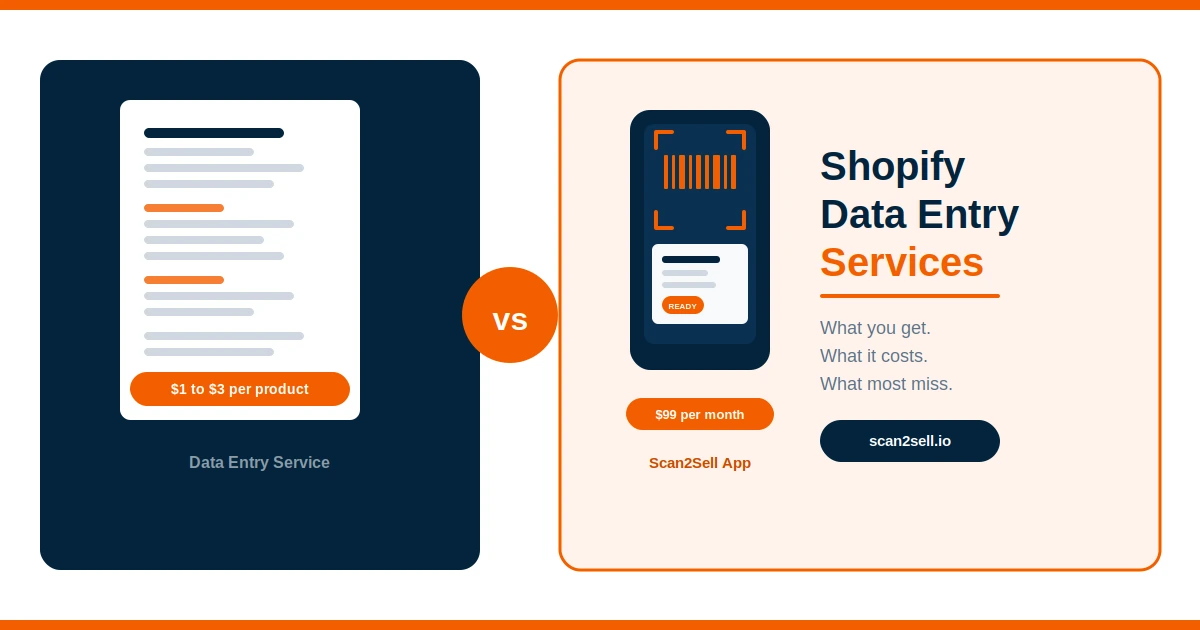
Pricing varies, but most freelance Shopify data entry services charge somewhere between $1 and $3 per product for straightforward listings. More complex products — multiple variants, custom fields, detailed descriptions — can run higher. If you are dealing with a catalogue of 500 products, you are looking at anywhere from $500 to $1,500 or more for a one-time upload.
Agencies and managed services tend to charge hourly, often between $15 and $40 per hour depending on location and specialization. For a merchant with ongoing inventory, that cost compounds quickly. And most services do not include ongoing support if the listing needs updating after the fact.
There is also the coordination cost. You are sending files, chasing revisions, waiting on delivery windows. For a single large upload it might make sense. For regular inventory turnover, it starts to feel like more work than doing it yourself.
The Gap Most Merchants Do Not Know Exists
Here is where it gets interesting. Most merchants searching for a data entry service do not know that barcode-based listing tools exist for Shopify. They assume the options are: do it yourself manually, or pay someone to do it manually for you.
There is a third path. When a product has a barcode, scanning it in an app like Scan2Sell generates a structured product listing. The title, description, category, dimensions, and product images appear without manual entry. You review it, set your price and quantity, and publish. For barcoded products, the process that might take a service two days to batch and return takes a few seconds per item.
Products without barcodes are not left out either. A photo taken from your phone camera is enough to generate a draft listing. The same review-and-publish workflow applies.
Scan and review in seconds
Scan a barcode with your phone or a Bluetooth handheld scanner. A structured listing appears with title, description, category, and product images ready for your review before anything is published.
No barcode? No problem
Photo-based listing
Take a photo of the product with your phone. Scan2Sell uses the image to generate a draft listing. Same review and publish flow, no barcode required.
CSV upload for large catalogues
Download the Scan2Sell CSV template, enter your product barcodes, and upload the file back into the app. Listings are generated in bulk without manual entry for each item.
Works inside Shopify POS
Scan2Sell integrates with Shopify POS so you can scan products directly from your store floor without switching between systems or apps.
When a Data Entry Service Still Makes Sense
To be fair, there are situations where hiring a service is the right call. If your products do not have barcodes, are highly customized, or require complex variants, a person who understands your brand and products may produce better results than any tool. Antique dealers, handmade goods sellers, and businesses with bespoke items often fall into this category.
The same applies if you have a one-time legacy catalogue you need uploaded without any ongoing inventory movement. Paying a service to handle that once and move on is a reasonable choice.
But for retail stores, resellers, liquidators, or any merchant dealing with regular physical inventory that carries standard barcodes, the data entry service model tends to create dependency rather than solve the underlying problem.
A More Sustainable Workflow
The merchants who get product listings under control are usually the ones who stop treating it as a data problem and start treating it as a workflow problem. The goal is not just to get 500 products online once. It is to build a process that handles the next 500, and the 500 after that, without rebuilding from scratch each time.
A scanning workflow fits naturally into the physical rhythm of retail. You are already handling the products. Scanning happens at the same moment. The listing is ready before the product goes on the shelf. No batching, no waiting, no additional coordination.
For merchants who are new to ecommerce, that kind of workflow is what makes going online feel manageable rather than overwhelming.
Frequently Asked Questions
How much does a Shopify data entry service typically cost?
Most freelance services charge between $1 and $3 per product for standard listings. Hourly rates for agencies typically range from $15 to $40 per hour. Costs increase for products with variants, complex descriptions, or large image sets. For high-volume or ongoing inventory, these costs add up quickly.
What happens if my products do not have barcodes?
Scan2Sell supports photo-based listing creation. You take a photo of the product with your phone camera and a draft listing is generated from the image. You review and edit the details before publishing. No barcode is required for this workflow.
Can I upload products to Shopify in bulk without a service?
Yes. Scan2Sell supports CSV bulk uploads. You download the Scan2Sell CSV template, fill in your product barcodes, and upload the file back into the app. Listings are generated from the barcode data, removing the need for manual entry on each product.
Does Scan2Sell publish listings automatically?
No. Every listing goes through a review step before it is published. You can edit the title, description, price, and quantity after the listing is generated. Nothing is pushed to your Shopify store without your approval.
What does Scan2Sell cost compared to hiring a service?
Scan2Sell is $99 per month with unlimited scans. For a merchant uploading 200 or more products per month, that works out to less than $0.50 per listing, with no per-product fees, no waiting on delivery, and no coordination overhead.
Try Scan2Sell on Your Shopify Store
Scan your first product today and see how fast a listing comes together. No data entry required.
Get Scan2Sell — $99/month