
A Shopify product data entry service is a person or team you pay to type your product information into Shopify: titles, descriptions, images, categories, prices, SKUs and stock counts. Most freelancers charge $1 to $3 per product for a standard listing, and hourly help usually runs $15 to $40 an hour. Below is what you get for that money, how to hire well, and when it costs less to scan the barcodes yourself.
If you are reading this, you probably have a stockroom, a garage or a set of shelves full of products and a Shopify store with very few of them in it. Paying someone else to fix that is a reasonable idea. It just helps to know what you are buying first.
What a Shopify data entry service does
Product data entry services take the information you already have and turn it into Shopify listings. You send them a spreadsheet, a supplier sheet, product photos or pictures of the packaging. They fill in Shopify field by field:
- Product title and description
- Images
- Category and product type
- Price and compare-at price
- SKU, barcode and variants (sizes, colors)
- Inventory count and weight
Some product upload services work directly in your Shopify admin. Others build a CSV file that you import yourself. Bulk product upload services do the same job at a larger scale, often for a one-time catalog of hundreds or thousands of items.
The output is real. Your products end up online. But the work is still a person doing by hand what you would have done by hand, so it carries the same limits. It takes time, you pay per product or per hour, and the listing is only as good as the information you hand over.
What product data entry services cost
Prices depend on who does the work, where they are based and how much detail each listing needs. These are the ranges merchants are usually quoted.
| Who | How they charge | Typical price | Good for |
|---|---|---|---|
| Freelancer (Upwork, Fiverr) | Per product | $1 to $3 for a standard listing | A one-time batch with clean data |
| Virtual assistant (VA) | Per hour | $15 to $40 an hour | Ongoing help that also covers other tasks |
| Agency or managed service | Per project or per hour | Quoted per job, usually above freelancer rates | Large catalogs that need a team and a deadline |
A catalog of 500 products at $1 to $3 each comes to $500 to $1,500 for the first upload. Products with many variants, custom fields or written-from-scratch descriptions cost more. Ask whether the quote includes product photos, category mapping and fixes after delivery, because those are where extra charges show up.
Then there is the cost that never appears on an invoice. You prepare the files, explain what you want, wait for delivery and check the work for mistakes. That is still your time, spent differently.
How to hire a product entry service
Most merchants skip these questions and wish they had not. Before you sign up with any product entry service, get clear answers to these:
- How do you handle revisions if product details are entered incorrectly?
- What is the turnaround time for a batch of 100 products? 500 products?
- Do you work directly in my Shopify admin, or do you hand back a CSV?
- What happens when I add new inventory next month? Is that a new quote?
- Who will have access to my Shopify store, and what permissions do they need?
- Can I see Shopify listings you have completed for other retail clients?
Also check reviews from stores like yours, and ask who writes the descriptions. Most services copy the information you give them into the right fields. Original, on-brand copy is usually extra, so ask for that price up front if it matters to you.
What to send a data entry service
The cleaner your starting file, the cheaper and better the result. Before you ask for quotes, put together:
- One row per product with its barcode, SKU, price and quantity
- The supplier's product sheet, if you have one
- Clear photos, or a note saying which products need photos taken
- Your categories or collections, so every product lands in the right place
- Two or three listings you already like, as an example of the style you want
A service working from a tidy file can quote you a firm price. A service working from a box of mixed products will quote high to cover the guesswork.
When you give someone access, add them as a staff member in Shopify with only the permissions they need, and remove that access when the job is done. That is safer than sharing your own login.
Comparing your options: VA vs agency vs CSV vs scanning it yourself
There are four common ways to get a physical catalog into Shopify. Each one fits a different store.
| Virtual assistant | Agency | Shopify CSV import | Scanning it yourself | |
|---|---|---|---|---|
| Who does the work | A person you hire | A team you hire | You, in a spreadsheet | You, with a phone or Bluetooth scanner |
| Cost | $15 to $40 an hour | Quoted per project | Free with Shopify | $99 a month for unlimited scans |
| Time | Depends on their hours and your brief | Depends on the contract and deadline | Hours of typing and formatting per batch | One scan per item, then a review |
| Accuracy | Only as good as the data you send | Usually checked, at a higher price | Format mistakes are common | Details appear from the barcode, and you review each one |
| New stock next month | Pay again | Pay again | Build another file | Scan it when it arrives |
| Best for | Mixed tasks and products with no barcode | Big one-time catalogs on a deadline | Stores that already have clean product data | Barcoded retail stock that changes often |
Shopify's own CSV route costs nothing, but every title, description and image link has to be typed or pasted in the exact format Shopify expects. Our Shopify CSV import guide covers that format and the errors that trip people up.
When a VA or service really is the right call
Some stores are better off hiring help. Be honest about which group you are in.
- Handmade, vintage or one-of-a-kind products. They usually have no barcode, and each one needs a description that a person writes. Antique dealers, artists and makers often need someone who understands the product.
- A one-time catalog that rarely changes. If you need 400 legacy products online once and your stock barely moves after that, paying a service once and moving on is a sensible choice.
- You need more than listings. A good VA can also answer emails, edit photos and update your theme. If you need a general helper, data entry can be one of their jobs.
- Original copy matters more than speed. If every description has to sound like your brand, a skilled writer will do better than any tool.
When scanning it yourself costs less
The math changes when your products carry barcodes (UPC, EAN or ISBN) and new stock keeps arriving. Retailers, resellers, liquidators, thrift stores and collectors who restock every month end up paying a service again and again for the same kind of work.
Here is a simple way to check. Uploading 200 products a month through a service at $2 per product is $400 a month, every month. At 500 products it is $1,000 or more, before revisions. Scan2Sell is $99 a month with unlimited scans, so at 200 products a month that works out to under $0.50 a listing.
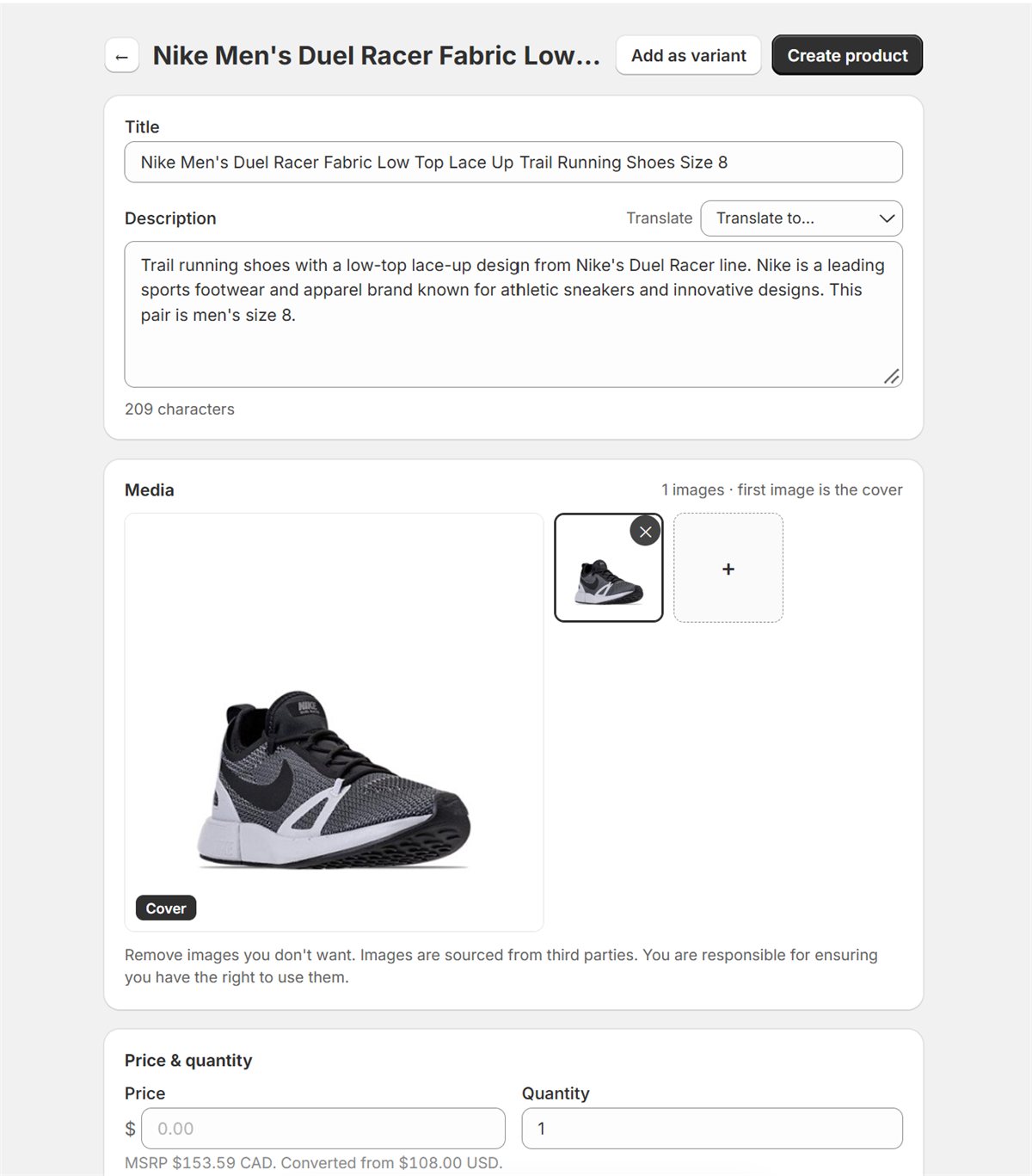
With a scanning app, the data entry happens while you are already handling the product. Scan a barcode with your phone camera or a cordless Bluetooth scanner, and a title, description, category and product images appear on a review card. You check it, add your price and quantity, and save it. New products are saved as drafts unless you turn on auto-publish. See our guide to Shopify barcode scanners for which scanners work.
It also covers the jobs a data entry service usually charges extra for:
- Products with no barcode. Use Take Picture and a listing appears from up to 4 photos.
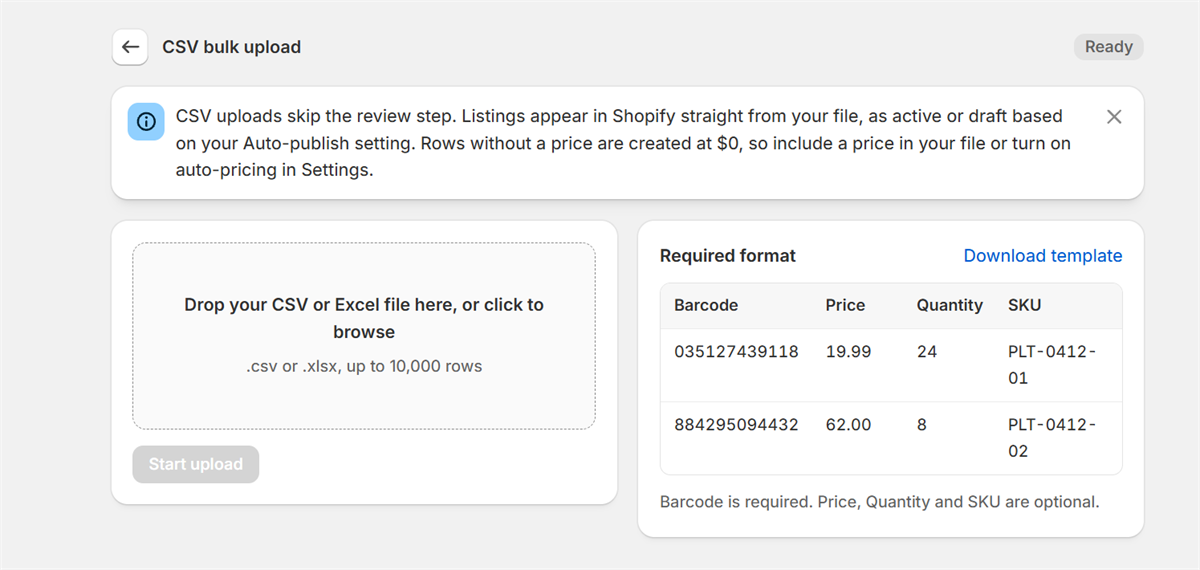
- Barcodes already in a spreadsheet. Download the Scan2Sell CSV template and upload up to 1,000 rows. Only the barcode is required. These rows skip the review step, so include a price.
- Sizes and colors. Add as variant puts every size under one listing, and each variant keeps its own barcode.
- Pallets and big deliveries. The Pallet uploader receives a whole delivery against its invoice and tags every product with the invoice number.
- Restocking. Scan a product you already sell and Already in your store appears, so you can add stock instead of creating a duplicate listing.
Scanning does not replace a writer for one-of-a-kind items, and it is not free. For barcoded stock that turns over every month, it usually costs less than paying per product. Want to see it on a real store? Read how Pauline's got its products onto Shopify.
Frequently asked questions
How much does a Shopify data entry service cost?
Freelancers usually charge $1 to $3 per product for a standard listing. Hourly help, such as a VA, usually runs $15 to $40 an hour. Variants, original descriptions and photo editing cost more.
Should I hire a VA or use a scanning app?
Hire a VA for handmade, vintage or one-of-a-kind products, or if you need help with more than listings. Use a scanning app if most of your products have barcodes and new stock arrives often.
Can I upload products to Shopify in bulk without hiring anyone?
Yes. Shopify's own CSV import is free if you already have all the product details in a spreadsheet. If you only have barcodes, the Scan2Sell CSV template needs just the barcode column, and the rest of each listing appears for you.
Is it safe to give a data entry service access to my Shopify store?
It can be. Add them as a staff member with only the permissions they need instead of sharing your login, and remove their access when the work is done.
What if some of my products have barcodes and some do not?
Scan the ones with barcodes and use Take Picture for the rest. Both end up on the same review card before you save them to Shopify.